
Last Updated on December 5, 2025
Managing your business finances doesn’t have to be complicated, especially if you’re a freelancer or run a small team.
BrightBook is a cloud accounting tool that promises simplicity without sacrificing the essentials.
Designed for small businesses and solo entrepreneurs, BrightBook lets you track expenses, send professional invoices, and manage client payments, all in one place.
The real appeal isn’t just the features themselves, but the benefits they bring: less time spent chasing payments, clearer insights into your cash flow, and more energy to focus on growing your business.
In this BrightBook review, we’ll explore how it works, what sets it apart, and whether it’s the right fit for your business.
By the end, you’ll understand if BrightBook can simplify your accounting or if a more advanced paid solution might better meet your needs as your business grows.
| Attribute | Score |
|---|---|
| Ease of Use | |
| Customer Support | |
| Integrations | |
| Features | |
| OVERALL RATING |
Pros
- Free to use
- Simple and user-friendly
- Cloud-based access
- Invoice management
- Expense tracking
- No ads or distractions
Cons
- Limited features
- Basic reporting
- No mobile app
- Not ideal for scaling businesses
- Customer support limitations
Jump To Section:
Company Background
BrightBook was created with a focus on simplicity and affordability for small business owners and freelancers.
The platform is designed to make accounting approachable for anyone, even if they don’t have a financial background.
BrightBook has gained attention for offering free, easy-to-use tools that cover essential bookkeeping and invoicing.
Its lightweight design makes it ideal for solo entrepreneurs, small teams, and service-based businesses who need basic accounting functionality without a steep learning curve.
The company emphasizes helping businesses stay organized, get paid faster, and understand their finances without the overhead of more complex software.
While it doesn’t offer the full suite of features found in premium accounting platforms, BrightBook serves as a practical entry point for small businesses looking to simplify their day-to-day financial management.
What Makes BrightBook Unique?
BrightBook stands out in the small business accounting space because it prioritizes simplicity without sacrificing essential functionality.
While many accounting tools can feel overwhelming, BrightBook focuses on helping entrepreneurs handle the basics efficiently.
Key points that make BrightBook unique include:
1. Completely Free to Use
BrightBook’s core features, including invoicing, expense tracking, and client management, are available at no cost, making it highly accessible to freelancers and startups.
2. User-Friendly Design
Its clean and straightforward interface ensures even those with minimal accounting experience can navigate and manage finances confidently.
3. Quick Invoicing & Payment Tracking
BrightBook allows you to create professional invoices in seconds and keep track of payments, improving cash flow and reducing delays.
4. Lightweight Yet Practical
While it may lack some advanced features of bigger platforms, it covers all the essentials for small businesses and solopreneurs.
5. Time-Saving Benefits
By automating basic bookkeeping tasks, BrightBook lets users focus more on growing their business and less on manual accounting work.
In essence, BrightBook is built for those who want to get their finances under control quickly and efficiently, without navigating the complexity often found in larger accounting platforms.
Pricing & Value
One of BrightBook’s most appealing features is its completely free core plan, which covers invoicing, expense tracking, and client management, making it a great option for freelancers, solopreneurs, and small teams just starting out.
All you need to do is sign up:
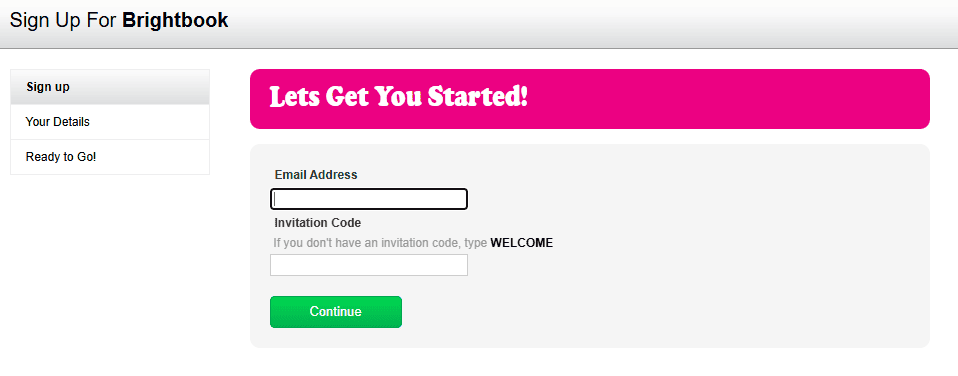
Since BrightBook focuses on simplicity, there aren’t multiple paid tiers like some competitors.
This makes it easy to understand exactly what you’re getting without worrying about hidden costs or confusing upgrades.
Value perspective:
Cost-effective: For a platform that handles invoicing, expense tracking, and basic bookkeeping, being free provides tremendous value compared to many paid solutions.
Time-saving benefits: By streamlining accounting tasks, BrightBook helps you focus more on your business and less on manual bookkeeping.
Low barrier to entry: You can start immediately without worrying about subscriptions or trials, which is perfect for businesses that are just testing accounting software for the first time.
While BrightBook is excellent for small, lean operations, larger businesses or those seeking advanced features, integrations, or detailed reporting may eventually require a paid platform.
For its target audience, however, BrightBook delivers strong value, simplicity, and efficiency at no cost.
What Users Are Saying
BrightBook has earned praise among freelancers, small business owners, and solo entrepreneurs for its simplicity and ease of use.
Here’s a look at common feedback:
Positive reviews
- Users love the intuitive interface, which makes managing invoices and expenses straightforward.
- Many appreciate that the platform is completely free, giving small businesses essential tools without any cost.
- Invoicing and payment tracking are highlighted as efficient and time-saving, helping businesses get paid faster.
- Users often mention that it’s perfect for those new to accounting software, thanks to its minimal learning curve.
Negative reviews
- Some users note the lack of advanced features, such as inventory management, multi-currency support, or in-depth reporting.
- BrightBook doesn’t offer extensive integrations with other apps, which may limit workflow automation for larger businesses.
- A few users would like additional customization options for invoices and reports.
Overall sentiment:
BrightBook is generally described as simple, reliable, and extremely budget-friendly.
While it may not replace high-end accounting software for growing businesses, it’s an excellent choice for small teams and solo entrepreneurs looking to get their finances under control quickly.
Is This Software Right for You?
BrightBook is best suited for you in these cases:
- If you need a free, easy way to send invoices, track payments, and manage basic bookkeeping, BrightBook is ideal.
- Consultants, coaches, designers, and agencies benefit from the simple time-saving tools that handle daily financial tasks.
- BrightBook allows you to access essential accounting tools without any upfront costs, making it perfect for businesses just getting started.
- If accounting software intimidates you, BrightBook’s intuitive interface makes it easy to manage finances without stress.
It may not be right for you in these scenarios:
- Growing businesses with complex needs: BrightBook lacks advanced reporting, integrations, and multi-currency support that larger operations may require.
- Companies that rely on extensive app integrations: If your business needs seamless connections with other software, BrightBook may be limiting.
- Businesses requiring advanced financial analytics: While BrightBook covers the basics well, it doesn’t provide the deeper insights offered by premium accounting tools.
Bottom line:
BrightBook is perfect for small, lean operations looking to simplify accounting and invoicing.
It’s cost-effective, user-friendly, and a great way to manage finances without feeling overwhelmed.
Our Final Verdict
BrightBook is a standout option for freelancers, solo entrepreneurs, and small teams who want a simple, free solution to manage their finances.
It covers essential tasks such as invoicing, expense tracking, and client management without the need for a steep learning curve or subscription costs.
The platform shines in its ease of use, time-saving benefits, and affordability, making it ideal for small businesses that want to focus on growth rather than wrestling with complicated accounting software.
By helping users get paid faster and maintain organized finances, BrightBook delivers real, practical benefits that go beyond just listing features.
However, if your business is growing, handling multiple currencies, or needs deeper reporting and integrations, a top paid cloud accounting platform may better suit your needs.
Investing in a more robust solution can save time, provide actionable insights, and help you scale efficiently.
Bottom line:
BrightBook is perfect for those starting lean or managing a small operation, offering simplicity and strong value at no cost.
For businesses that anticipate growth or need more advanced capabilities, considering a premium platform is a smart next step.
FAQ
Can I send invoices with BrightBook?
Absolutely. You can create professional invoices quickly and track payments, helping improve cash flow.
Does BrightBook track expenses?
Yes, it allows you to log expenses and monitor spending, giving you a clearer picture of your business finances.
Is BrightBook suitable for larger businesses?
BrightBook is primarily designed for freelancers and small teams. Larger businesses with complex workflows or multi-currency needs may find it limiting.
Are there paid plans?
BrightBook focuses on providing its core features for free. It does not have multiple paid tiers, but businesses needing advanced features might consider a premium accounting platform.
Can I manage multiple clients?
Yes, BrightBook allows you to handle multiple clients, making it suitable for service-based businesses and freelancers managing different projects.
Is BrightBook beginner-friendly?
Yes, its intuitive interface makes it accessible even if you have little to no accounting experience.
Wrapping Up
BrightBook is an excellent choice for freelancers, solopreneurs, and small teams who need a simple, free way to manage their finances.
It handles essential tasks like invoicing, expense tracking, and client management, saving time and helping you stay organized.
The biggest benefit lies in how much it reduces the stress and effort of day-to-day bookkeeping, allowing you to focus on growing your business.
That said, if your business is expanding, handling multiple clients, or requires more advanced features like detailed reporting, integrations, or multi-currency support, a top paid cloud accounting software might be a better fit.
Investing in a premium platform can provide deeper insights, automate complex tasks, and give you more flexibility to scale efficiently.
Start with BrightBook if you want simplicity and cost-efficiency.
As your business grows, upgrading to a robust paid solution can save time, improve decision-making, and set your business up for long-term success.
Comparisons:

- Best Accounting Software For Restaurants In 2026 - January 5, 2026
- Best Accounting Software For Retail Businesses In 2026 - January 4, 2026
- Best Accounting Software For Property Management - January 4, 2026