
Last Updated on December 5, 2025
For small business owners seeking a simple, straightforward cloud accounting solution, Kashoo Accounting positions itself as a no-fuss platform that prioritizes ease of use and automation.
Designed for freelancers, solo entrepreneurs, and small teams, Kashoo focuses on streamlining bookkeeping, invoicing, and expense tracking without overwhelming users with unnecessary features.
What makes Kashoo stand out is its clean, intuitive interface paired with essential automation.
From bank feeds that automatically categorize transactions to simple invoicing and reporting, Kashoo is built to help business owners save time and maintain accurate financial records with minimal effort.
In this Kashoo Accounting review, we’ll explore the software’s features, pricing, pros and cons, and whether it’s the right fit for your small business.
| Attribute | Score |
|---|---|
| Ease of Use | |
| Customer Support | |
| Integrations | |
| Features | |
| OVERALL RATING |
Pros
- Simple, User-Friendly Interface
- Automation Features
- Unlimited Users
- Affordable Pricing
- Cloud-Based & Mobile Access
- Reliable Customer Support
Cons
- Limited Advanced Features
- No Payroll Integration
- Fewer Third-Party Integrations
- Limited Time Tracking
Jump To Section:
Company Background
Kashoo Accounting was founded in 2008 by Jim Secord with a mission to create simple and accessible accounting software for small businesses and freelancers.
The company focuses on cloud-based bookkeeping solutions that reduce the complexity often associated with traditional accounting software.
Kashoo has grown steadily, gaining a reputation for user-friendly design, straightforward pricing, and strong automation features.
Unlike larger competitors such as QuickBooks Online or Xero, Kashoo targets small businesses that need essential accounting tools without the steep learning curve or overwhelming options.
Its platform includes core bookkeeping functions such as invoicing, expense tracking, bank reconciliation, and reporting.
With automatic bank feeds, multi-currency support, and a cloud-first model, Kashoo ensures that small business owners can manage finances anytime, anywhere, without being bogged down by unnecessary features.
What Makes Kashoo Accounting Unique?
Kashoo Accounting stands out in the crowded small business accounting space because of its simplicity, automation, and focus on core bookkeeping needs.
It avoids the complexity of larger platforms while still providing the essential features that small businesses and freelancers require.
Key features that make Kashoo unique include:
1. Automated Bank Feeds
Connect your bank accounts and credit cards, and Kashoo will automatically categorize transactions to simplify bookkeeping.
2. Simple, Clean Interface
Designed for non-accountants, making it easy to manage invoices, expenses, and reports without extensive training.
3. Unlimited Users
Unlike many competitors, Kashoo allows unlimited users on all plans without additional costs.
4. Multi-Currency Support
Helpful for small businesses dealing with international clients or vendors.
5. Cloud-Based Access
Fully online platform, accessible from any device with an internet connection.
6. Reliable Customer Support
Personalized support with real human interaction, often praised by users.
In essence, Kashoo is ideal for small businesses and freelancers who want a no-nonsense, easy-to-use accounting solution with automation that saves time while keeping finances accurate.
Pricing & Value
Kashoo Accounting offers a simple, transparent subscription model, making it an attractive option for freelancers and small businesses.
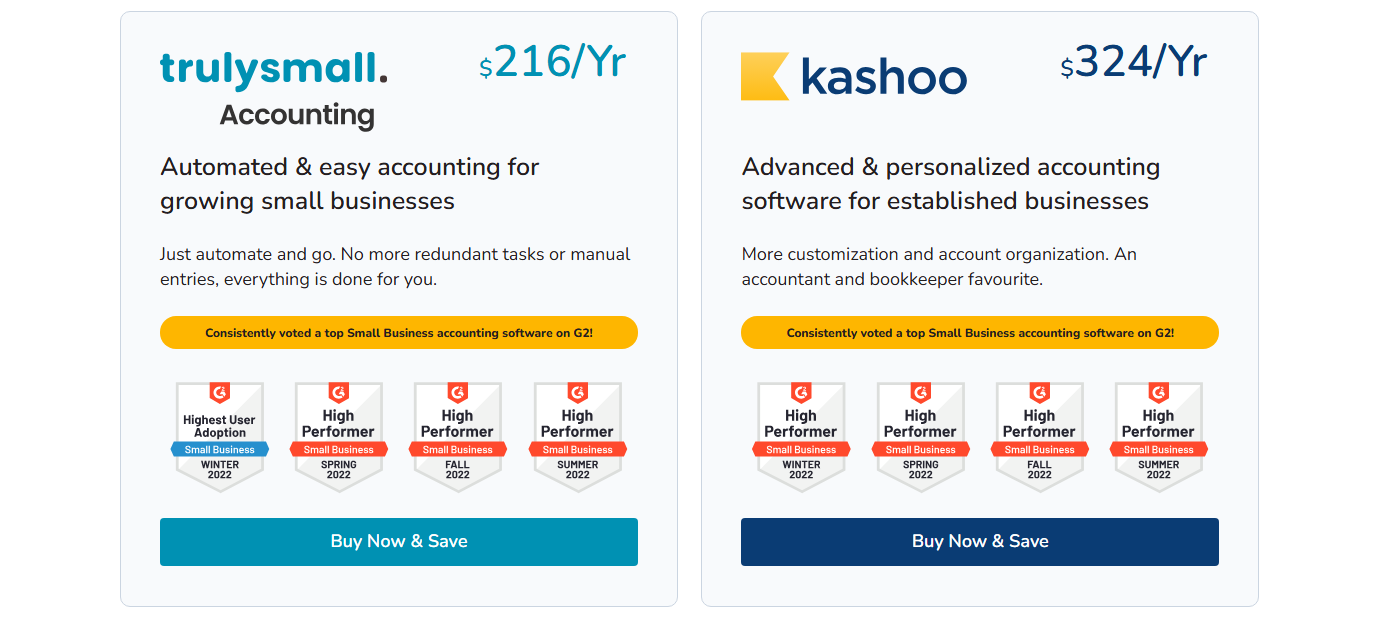
Single Plan:
Around $20 per month, which includes unlimited users, bank feeds, invoicing, expense tracking, and reporting.
Free Trial:
Kashoo offers a 14-day free trial to test all features before committing.
All-Inclusive Features:
Unlike some competitors that charge per user or for add-ons, Kashoo includes essential accounting tools in one plan, making pricing predictable and affordable.
Value Proposition:
- Affordable for Small Businesses: Flat pricing and unlimited users make it cost-effective for teams.
- Automation Saves Time: Automatic bank feeds and categorization reduce manual bookkeeping work.
- Cloud Access Anywhere: Being cloud-based ensures you can manage finances on the go without extra fees.
Kashoo delivers excellent value for freelancers and small business owners who want simplicity, automation, and predictable pricing in a cloud accounting solution.
What Users Are Saying
Kashoo Accounting is generally well-received by freelancers and small business owners who appreciate its simplicity and automation, though some note limitations compared to larger competitors.
Positive feedback:
- Easy to Use: Users praise the intuitive, clean interface that makes bookkeeping simple for non-accountants.
- Automation Saves Time: Bank feeds and automatic transaction categorization are consistently highlighted as major time-savers.
- Unlimited Users: Small teams appreciate being able to add multiple users without additional costs.
- Responsive Support: Users report helpful and friendly customer service.
Negative reviews:
- Limited Advanced Features: Some users feel Kashoo lacks advanced reporting and integrations available in platforms like QuickBooks Online or Xero.
- No Payroll Integration: Payroll must be managed separately.
- Occasional Mobile Limitations: While mobile-friendly, some features are limited compared to desktop use.
Overall sentiment:
Kashoo is seen as a lightweight, reliable, and efficient accounting tool for freelancers and small businesses that prioritize simplicity and automation over advanced features.
Is This Software Right for You?
Kashoo Accounting is ideal for:
- Freelancers and solo entrepreneurs who need a simple, easy-to-use accounting platform.
- Small business owners who want automation to save time on bookkeeping and expense tracking.
- Teams that need unlimited users without extra cost.
- Businesses looking for a cloud-based solution with mobile access anywhere.
It may not be the best choice if you:
- Require advanced reporting or analytics beyond the basics.
- Need integrated payroll or more complex payroll functionality.
- Want extensive third-party integrations for e-commerce or specialized business tools.
- Run a larger business with more complex accounting needs that go beyond Kashoo’s core features.
Kashoo works best for freelancers and small businesses seeking simplicity, automation, and reliable bookkeeping in a cloud platform, but may not meet the needs of growing or more complex businesses.
Our Final Verdict
Kashoo Accounting is a lightweight, cloud-based accounting solution tailored for freelancers, solo entrepreneurs, and small businesses.
Its clean interface, automation, and unlimited user access make it an appealing choice for those who want simple, reliable bookkeeping without the complexity of larger platforms.
The software excels at automating bank feeds, categorizing transactions, and providing essential reports, helping users save time and maintain accurate financial records.
Its flat pricing and cloud access add to its value, making it affordable and accessible from anywhere.
However, Kashoo may not meet the needs of growing businesses that require advanced reporting, payroll, or extensive integrations.
If you’re a freelancer or small business owner looking for a simple, cost-effective solution, Kashoo is a strong contender.
For small business owners who want easy, automated bookkeeping and cloud-based access, Kashoo Accounting delivers efficiency, simplicity, and reliable performance.
FAQ
Can Kashoo handle payroll?
No. Kashoo does not include integrated payroll, so you will need a separate payroll solution.
How much does it cost to use Kashoo Accounting?
Kashoo costs around $20 per month for all features, including unlimited users, bank feeds, and reporting.
Can I collaborate with my accountant or team remotely?
Yes. Being cloud-based, Kashoo allows multiple users to access the system from anywhere.
Is there a mobile app for Kashoo Accounting?
Yes. Kashoo has a mobile-friendly interface for tracking expenses, invoicing, and basic accounting functions on the go.
What reports can I generate with Kashoo Accounting?
You can generate profit & loss statements, balance sheets, expense reports, and sales reports, suitable for small business bookkeeping.
Can my team track time individually?
No. Kashoo does not have built-in time tracking functionality.
Is customer support helpful?
Yes. Users report that Kashoo’s support team is responsive and friendly, assisting with setup and troubleshooting.
How does Kashoo compare to QuickBooks, Xero, or FreshBooks?
Kashoo is simpler and more affordable, ideal for freelancers and small businesses. However, it lacks some advanced features, integrations, and payroll options available in QuickBooks Online, Xero, or FreshBooks.
Wrapping Up
Kashoo Accounting is a cloud-based, easy-to-use accounting solution designed for freelancers, solo entrepreneurs, and small businesses.
Its automation, unlimited users, and simple interface make bookkeeping less time-consuming and more accurate.
While it may lack advanced reporting, payroll, or extensive integrations found in platforms like QuickBooks or Xero, Kashoo’s affordable pricing and streamlined features make it an excellent choice for small business owners who want efficiency without complexity.
For small businesses seeking simple, reliable, and automated bookkeeping, Kashoo Accounting is a solid option.
Ready to simplify your bookkeeping? Start your Kashoo Accounting free trial today
and take control of your finances with ease.
Comparison:
- Kashoo vs QuickBooks Online
- Kashoo vs Xero
- Kashoo vs Zoho Books
- Kashoo vs FreshBooks
- Kashoo vs Sage
- Kashoo vs Wave Accounting
- Kashoo vs OneUp
- Kashoo vs Patriot Software
- Kashoo vs AccountEdge Pro

- Best Accounting Software For Restaurants In 2026 - January 5, 2026
- Best Accounting Software For Retail Businesses In 2026 - January 4, 2026
- Best Accounting Software For Property Management - January 4, 2026