Last Updated on December 5, 2025
Managing your business finances efficiently doesn’t have to be complicated or expensive, and OneUp Accounting promises to deliver exactly that.
Designed for small and growing businesses, OneUp is a cloud accounting software that combines automation, simplicity, and flexibility to help you stay on top of bookkeeping, invoicing, inventory, and CRM, all in one platform.
What makes OneUp stand out is its automation-first approach: it can automatically sync bank transactions, categorize expenses, and even reconcile accounts, saving business owners valuable time.
With mobile access, integrated CRM, and inventory management, it aims to give small business owners a complete view of their operations in a single, easy-to-use dashboard.
In this OneUp Accounting review, we’ll explore its features, pricing, pros and cons, and help you decide whether it’s the right accounting solution for your business.
| Attribute | Score |
|---|---|
| Ease of Use | |
| Customer Support | |
| Integrations | |
| Features | |
| OVERALL RATING |
Pros
- All-in-One Platform
- Automation Features
- Cloud-Based & Mobile Access
- Affordable Pricing
- Customizable Reporting
- Easy Collaboration
Cons
- Limited advanced features
- Fewer integrations
- Learning curve for new users
- No payroll integration
Jump To Section:
Company Background
OneUp Accounting was founded in 2012 with a mission to create a cloud-based accounting platform that combines bookkeeping, inventory management, and CRM in a single tool.
The company targets small to medium-sized businesses looking for an all-in-one solution that reduces the need for multiple software subscriptions.
OneUp has grown steadily and gained a reputation for automation-driven features, such as auto-categorizing bank transactions and invoicing, making it easier for business owners to manage finances without extensive accounting knowledge.
Its cloud-first approach means users can access their data anywhere, on any device, which is particularly appealing for remote teams or businesses on the move.
By integrating CRM, inventory, and accounting, OneUp differentiates itself from traditional bookkeeping software, providing a more complete picture of business operations while saving time and reducing manual data entry.
What Makes OneUp Accounting Unique?
OneUp Accounting stands out due to its all-in-one approach and focus on automation, which helps business owners save time and reduce manual bookkeeping errors.
Unlike many accounting platforms that only focus on finances, OneUp integrates CRM and inventory management, making it a versatile tool for managing multiple aspects of a business in one place.
Key features that make OneUp unique include:
1. Automated Bookkeeping
OneUp can automatically sync and categorize your bank and credit card transactions, helping you reconcile accounts with minimal effort.
2. Integrated CRM
Keep track of customers, sales, and communications without using separate software.
3. Inventory Management
Manage stock, sales orders, and purchase orders directly within the platform, ideal for small businesses with physical products.
4. Cloud-Based & Mobile Access
Access your financial data anywhere, anytime, with full mobile support.
5. Affordable Pricing with Essential Features
Provides an all-in-one solution at a cost that’s competitive for small business owners.
6. Customizable Reporting
Generate profit & loss statements, balance sheets, and sales reports tailored to your business needs.
In short, OneUp is designed for small businesses that want automation, integration, and mobility, reducing manual work while providing a complete overview of operations.
Pricing & Value
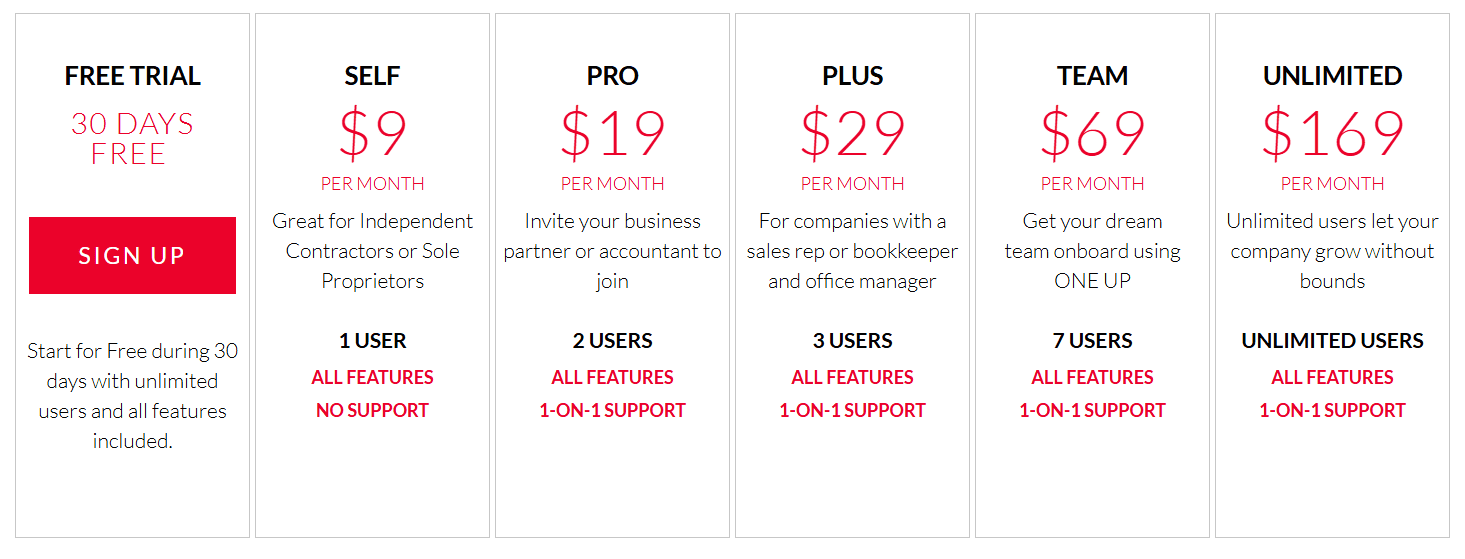
OneUp Accounting offers a cloud-based subscription model with a straightforward pricing structure, making it accessible for small and growing businesses.
Single Plan
Around $9–$19/month per user, depending on the features you select.
Free Trial
OneUp offers a 14-day free trial, allowing you to test its features before committing.
All-in-One Value
The pricing includes accounting, CRM, and inventory management in one package, thus eliminating the need for multiple subscriptions.
Value Proposition
- Affordable Automation: OneUp’s automation features save time and reduce bookkeeping errors, which translates to cost savings.
- No Hidden Fees: Pricing is transparent, and all core features are included in the subscription.
- Cloud and Mobile Access: Unlike desktop software, OneUp lets you work from anywhere without additional cost.
OneUp provides high value for small business owners seeking a combined accounting, CRM, and inventory solution at an affordable monthly rate.
Its automation features make it especially appealing for entrepreneurs who want to streamline business operations.
What Users Are Saying
Users of OneUp Accounting generally appreciate its automation, all-in-one functionality, and cloud accessibility, though some note minor drawbacks.
Positive reviews
- Time-Saving Automation: Many users love that bank transactions are automatically synced and categorized, reducing manual bookkeeping work.
- All-in-One Platform: Customers highlight the convenience of having CRM, accounting, and inventory management in a single platform.
- User-Friendly Interface: The software is intuitive, making it easier for small business owners and non-accountants to navigate.
- Cloud & Mobile Access: Users enjoy being able to manage finances and inventory from anywhere, on any device.
Negative reviews
- Limited Advanced Features: While great for small businesses, some users feel OneUp lacks deeper accounting features that larger businesses may need.
- Reporting Could Be Improved: A few reviews note that custom reports are somewhat limited compared to competitors like QuickBooks or Xero.
- Learning Curve for Inventory & CRM: Integrating all modules effectively can take time, especially for users new to accounting software.
OneUp Accounting is well-regarded for automation, convenience, and affordability, making it a solid choice for small businesses seeking an integrated solution.
Is This Software Right for You?
OneUp Accounting is best suited for:
- Small business owners who want a single platform for accounting, CRM, and inventory management.
- Entrepreneurs seeking automation to reduce manual bookkeeping and save time.
- Businesses that need mobile and cloud access, allowing financial management from anywhere.
- Companies that want affordable, all-in-one software without subscribing to multiple tools.
It may not be ideal if you:
- Run a mid-sized or larger business that requires advanced accounting features or detailed reporting.
- Prefer a desktop-first solution with full control over local data.
- Require extensive third-party integrations, as OneUp has fewer compared to major cloud competitors like QuickBooks Online or Xero.
- Want highly customizable reports or industry-specific modules beyond the standard features.
OneUp is perfect for small businesses that value automation, mobility, and integration, but larger or rapidly growing companies may need a more advanced platform.
Our Final Verdict
OneUp Accounting delivers a cloud-based, all-in-one solution for small businesses that want accounting, CRM, and inventory management in a single platform.
Its automation features save time, reduce errors, and make bookkeeping easier, while its cloud accessibility allows business owners to manage finances from anywhere.
The software’s affordable subscription model is ideal for small businesses or startups that need an integrated solution without investing in multiple software tools.
Its strengths lie in simplicity, convenience, and automation, making it suitable for entrepreneurs and small teams.
That said, OneUp may not meet the needs of larger or rapidly growing businesses, as it lacks some advanced reporting, deeper accounting functionality, and extensive third-party integrations offered by competitors like QuickBooks Online or Xero.
For small businesses seeking automation, affordability, and an all-in-one platform, OneUp Accounting is a strong contender.
FAQ
Can OneUp handle payroll?
No, OneUp does not include integrated payroll. Businesses needing payroll management will need a separate solution.
How much does it cost to use OneUp Accounting?
OneUp starts at around $9–$19 per user per month, depending on the plan and features you select.
Can I collaborate with my accountant or team remotely?
Yes. Being cloud-based, OneUp allows multiple users to access and manage financial data from anywhere.
Is there a mobile app for OneUp Accounting?
Yes. OneUp provides mobile access so you can track finances, invoices, and inventory from your phone or tablet.
What reports can I generate with OneUp Accounting?
OneUp lets you generate profit & loss statements, balance sheets, inventory reports, sales reports, and other customizable financial summaries.
Can my team track time individually?
Yes. OneUp supports time tracking, allowing you to allocate hours to projects for invoicing and job costing.
Is customer support helpful?
Yes. Users report that support is responsive and helpful, though some advanced accounting questions may require additional research or guidance.
How does OneUp compare to QuickBooks, Xero, or FreshBooks?
OneUp is more affordable and automation-focused with integrated CRM and inventory, making it ideal for small businesses. However, it has fewer third-party integrations and less advanced reporting than QuickBooks Online, Xero, or FreshBooks, which may be better for growing businesses.
Wrapping Up
OneUp Accounting is a cloud-based, all-in-one platform that combines accounting, CRM, and inventory management. Its automation features streamline bookkeeping, reduce errors, and save valuable time for small business owners.
With mobile and cloud access, you can manage your business finances from anywhere, making it ideal for entrepreneurs and small teams.
While it may lack some advanced reporting and integrations compared to bigger competitors like QuickBooks or Xero, OneUp’s affordable pricing and comprehensive functionality make it a compelling choice for small businesses that want simplicity and efficiency in one platform.
If you’re a small business owner looking to automate bookkeeping, track inventory, and manage customers in one place, OneUp Accounting is worth trying.
Ready to simplify your business finances? Start your OneUp Accounting free trial today
and experience the convenience for yourself.
Comparison:
- OneUp vs QuickBooks Online
- OneUp vs Xero
- OneUp vs Zoho Books
- OneUp vs FreshBooks
- OneUp vs Sage
- OneUp vs Kashoo
- OneUp vs Wave Accounting
- AccountEdge Pro vs OneUp
- OneUp vs Patriot Software

- Best Accounting Software For Restaurants In 2026 - January 5, 2026
- Best Accounting Software For Retail Businesses In 2026 - January 4, 2026
- Best Accounting Software For Property Management - January 4, 2026