Last Updated on January 4, 2026
If you’re a small to mid-sized business searching for a trusted provider for your cloud accounting needs, Xero is one of the leading options to consider.
This is a global cloud accounting platform that has simplified financial management for millions of businesses worldwide.
Xero is especially known for its clean, intuitive interface and powerful features, such as bank reconciliation, invoicing, and reporting.
One of its biggest selling points is that it supports unlimited users on all plans and provides access to an ecosystem of over 1,000 app integrations.
That level of scalability isn’t always available with other accounting software.
In this detailed review of Xero, I’ll walk you through its top features, pricing, pros and cons, and real user feedback so you can decide whether it’s the right fit for your business in 2025 and beyond.
| Attribute | Score |
|---|---|
| Ease of Use | |
| Customer Support | |
| Integrations | |
| Features | |
| OVERALL RATING |
Pros
- Beautiful and intuitive user interface
- Strong bank reconciliation features
- Unlimited users
- Excellent integrations
- Multicurrency support
Cons
- Limited payroll support
- No direct phone support
- Limited features for larger businesses
- You pay more for advanced features
Jump To Section:
Company background
Xero was founded in 2006 by Rod Drury in Wellington, New Zealand, with the goal of making accounting simpler and more accessible for business owners.
Drury was frustrated by the limitations of traditional desktop accounting software, which was often complex, slow, and not optimized for the internet.
From its humble beginnings, Xero grew rapidly into a global company, now serving millions of small and medium-sized businesses across the globe.
The software was specifically designed to meet the needs of SMBs, with a focus on cloud-first functionality, automation, and scalability.
Today, Xero is widely recognized as one of the leaders in online accounting software, competing with other top players like QuickBooks Online and FreshBooks.
What makes Xero unique?
Xero has several standout features that make it a strong contender in the cloud accounting space.
Below are the highlights that set it apart:
1. Easy free trial activation
Unlike QuickBooks Online, Xero doesn’t require credit card details for its 30-day free trial.
- You only provide your name, email, phone, and location.
- You get access to all features during the trial—no limitations.
- A sample dashboard is included so you can quickly see how the system looks with real data.
This makes testing Xero simple and commitment-free.
2. Unlimited users in ALL plans
Every Xero plan allows you to add unlimited users at no extra cost.
- Competitors often charge per additional user, but Xero keeps it flat.
- This is ideal for growing businesses that need multiple team members or accountants collaborating in real time.
3. Real-time bank reconciliation
Xero connects securely to your bank and automatically pulls in transactions.
- The software matches payments to invoices and expenses with minimal manual input.
- This automation reduces errors and saves time, a big reason why users rate Xero highly for bank reconciliation.
4. Easy collaboration with Accountants
Xero makes it easy to invite your accountant or bookkeeper.
- You can set custom permissions based on role (e.g., payroll admin, projects, reporting).
- No need to share passwords or manually export files.
- Invitations are sent directly from the dashboard.
5. 1000+ third party integrations
Through the Xero App Store, you can connect to tools for:
- Inventory
- CRM
- E-commerce
- Payroll
- POS and more
This flexibility ensures Xero adapts to your specific workflows.
6. Clean, intuitive user interface
The dashboard is clutter-free and well-organized.
- Quick snapshots show invoices due, bills to pay, taxes, and reporting.
- Navigation is simple enough for non-accountants to master quickly.
7. Excellent mobile app
Available for both iOS and Android, the Xero app lets you:
- Send invoices
- Reconcile transactions
- Track expenses on the go
This is particularly useful for freelancers and small teams that need mobile flexibility.
8. Financial reports and dashboards
- Reports are customizable and update in real time.
- Mobile dashboards let you view performance anytime.
- No need to run complex reports just to see where your business stands.
9. Built-in multicurrency support
Xero supports over 160 currencies with live exchange rates.
- Convenient for businesses with international clients or suppliers.
- Note: This feature is only available in the Premium Plan.
10. Built-in automation
Xero streamlines repetitive tasks across all plans:
- Bank feeds and reconciliation
- Recurring billing
- Automatic reminders for overdue invoices
- Expense categorization rules
Advanced automation features are unlocked in higher tiers.
11. 100% cloud-based with automatic back-up
- Two-factor authentication and bank-grade security protect your data.
- Automatic backups ensure you can restore data anytime, even if you lose access to your device.
12. Built-in inventory management
Included in all plans:
- Real-time tracking of stock levels
- Automatic updates after sales/purchases
- Easy integration into quotes and invoices
Tracking of best-sellers and profit margins
13. Optimized for accountants and bookkeepers
Xero has a full ecosystem for financial professionals, including:
- The Xero Partner Program
- Dedicated Advisor Tools
- A directory of Xero-certified advisors
- Free Xero access for partners
This reduces friction for accountants and can even lower your bookkeeping costs.
Price and value
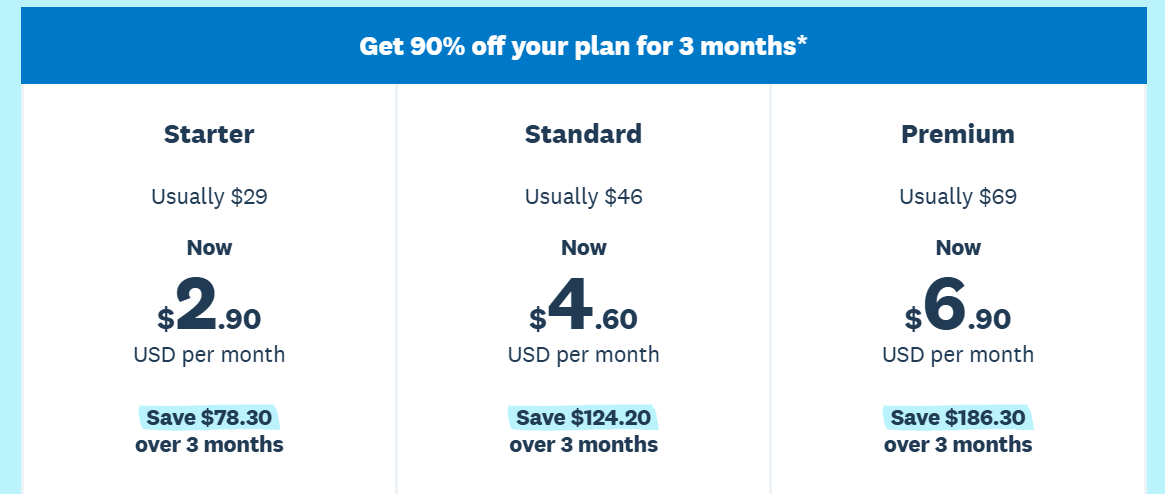
Xero offers three main plans to cater to different business needs:
- Starter Plan: ideal for very small businesses or solo entrepreneurs
- Standard Plan: for growing businesses with more transactions and users
- Premium Plan: for businesses that need advanced features, including multi-currency support
All plans come with a 30-day free trial, and you don’t need a credit card to activate it.
This makes it easy to explore all the features without commitment.
Xero also runs promotions from time to time, giving new users the opportunity to save significantly.
For example, at the time of writing, the monthly subscription for each plan was reduced by 90% for the first 3 months, a generous offer for small businesses looking to get started without high upfront costs.
Compared to other top cloud accounting platforms like QuickBooks Online or FreshBooks, Xero provides competitive pricing, especially considering it allows unlimited users in all plans and integrates with over 1,000 third-party apps.
Whether you’re a freelancer, startup, or small-to-mid-sized business, Xero’s pricing structure is designed to offer flexibility, scalability, and value for money.
Comparison: Xero vs QuickBooks Online vs Zoho Books
| Feature/Plan | Xero | QuickBooks Online | Zoho Books |
|---|---|---|---|
| Starter / Entry Plan | Starter Plan: 30-day free trial, unlimited users, basic invoicing & bank reconciliation | Simple Start: Free 30-day trial, 1 user, basic invoicing & expense tracking | Free / Basic: 14-day free trial, limited features |
| Mid / Standard Plan | Standard Plan: Unlimited invoices & bills, multi-user, bank feeds | Essentials: 3 users, recurring invoices, bill management | Standard Plan: Multi-user, automation, client portal |
| Advanced / Premium Plan | Premium Plan: Multi-currency support, advanced reporting, 160+ currencies | Plus / Advanced: Multi-currency, inventory, project tracking | Professional Plan: Advanced automation, multi-currency, client portal |
| Free Trial | 30 days, no credit card | 30 days, credit card optional | 14 days, no credit card |
| Unlimited Users | All plans | Only in higher tiers | Limited by plan |
| Third-Party Integrations | 1,000+ apps | 700+ apps | ~50 apps |
| Mobile App | iOS & Android | iOS & Android | iOS & Android |
| Automation | Basic in all plans; advanced in Premium | Recurring invoices, payment reminders, rules | Recurring invoices, reminders, workflow automation |
| Pricing Notes | Promotions available; competitive for SMBs | Higher cost per user | Affordable, especially for Zoho ecosystem users |
Key Takeaways
- Xero: Best for growing SMBs that need unlimited users, robust integrations, and multi-currency support.
- QuickBooks Online: Ideal for U.S.-based businesses seeking familiar workflows, payroll, and strong reporting tools.
- Zoho Books: Great for cost-conscious businesses already in the Zoho ecosystem, with strong automation and core accounting features.
Add-ons to any Zoho Books plan
Xero allows you to enhance its core plans with optional add-ons, as indicated on their pricing page.
These come at an extra monthly cost and can be activated depending on your business needs.
1. Claim Expenses (from $4/month)
- This feature gives you tighter control over business and employee spending.
- Snap photos of receipts to make expense tracking paperless
Reimburse expenses quickly to avoid delays
- Monitor staff spending in real time
- Manage expenses easily through the Xero mobile app
2. Track Projects (from $7/month)
- Designed for service-based businesses and project managers.
- Track time, costs, and project budgets with built-in timers or location-based job tracking
- Automatically feed project details into invoices
- Monitor profitability of each project directly from your dashboard
3. Analytics Plus (Premium Plan add-on)
- Xero already includes basic analytics in all plans, but Analytics Plus adds advanced forecasting tools.
- Access a more customizable business snapshot
- Use scenario planning for “what if” analysis
- Gain deeper visual insights with extended projections (up to 90 days vs 60 days in basic analytics)
What users are saying?
To gauge real-world experiences, I analyzed feedback from trusted review platforms such as Trustpilot, G2, and Capterra.
Overall, Xero is recognized as a powerful cloud accounting tool with a strong reputation, though some users highlight areas that need improvement.
Positive reviews:
- Clean, modern user interface that’s easy to navigate
- Excellent reporting tools and financial overviews
- Unlimited users included in all plans at no extra cost
- Extensive third-party integrations for customization
- Bank feeds and automation save valuable time
- Strong security (2FA + bank-grade encryption)
- Very reliable, with uptime averaging 99.9%
Negative reviews:
- Live chat support can be inconsistent; no phone support is available
- Advanced features take time to master for beginners
- Higher-tier plans may feel costly for very small businesses
- Mobile app functionality is not as polished as desktop
- Limited customization options
- Basic inventory tools are not suitable for businesses with complex requirements
Is Xero right for you?
Based on user feedback above and testing, here’s who will benefit most from Xero:
Best for
- Small to mid-sized businesses needing scalable cloud accounting
- Freelancers and sole traders looking for professional invoicing and expense tracking
- Teams that need unlimited user access at no extra cost
- Accountants and bookkeepers collaborating with multiple clients
- Businesses using Shopify, Stripe, or other integrations
- Companies operating internationally that require multi-currency support
Might not be ideal if
- You want responsive live support (FreshBooks may be better)
- Your business has complex, large-scale inventory needs (QuickBooks may fit better)
- You need highly customized reporting or workflows
- You prefer offline access (Xero requires internet 100% of the time)
- You want step-by-step onboarding and troubleshooting help in real time
Bottom line
Xero remains an excellent choice for freelancers, startups, and growing small businesses.
The unlimited-users feature alone makes it cost-effective, while the modern UI and automation save time.
However, larger businesses with complex inventory, advanced customization needs, or reliance on real-time customer support may find more value in alternatives like QuickBooks Online or FreshBooks.
Our final verdict
My take: I used Xero and can say navigating around the platform is seamless and all the features you need as a small business are present.
The inclusion of unlimited users in all plans is a major win so if your business has multiple users, you should strongly consider Xero.
You easily customize your experience with more than 1000 third party app integrations.
Automation allows you to save time doing tasks like bank reconciliation, recurring invoices and sending reminders.
However, you may find their customer support frustrating as you can’t make a phone call or reliably reach out on live chat.
The Starter Plan may not meet your needs if you’re rapidly expanding or you need more advanced features.
You can try Xero out risk-free and see if it meets your needs.
FAQ
Can Xero handle payroll?
Yes, either as a built-in feature or using third-party payroll apps. The built-in feature is available for UK, New Zealand and Australia while for countries like the US, Canada or South Africa you use third-party apps like SimplePay.
How much does it cost to use Xero?
Xero has 3 plans with the following pricing:
Starter Plan: $29 per month (promo $2.90 for first 3 months)
Standard Plan: $46 per month (promo $4.60 for first 3 months)
Premium Plan: $69 per month (promo $6.90 for first 3 months)
Each plan has a 30-day free trial and optional add-ons. Prices can drop by as much as 90% when there is a promotion.
Can I collaborate with clients on Xero?
Absolutely! That's one of the strengths of Xero. You can invite clients, team members and accountants without sharing login details. Access levels can be customized for each user you invite, allowing you to share reports and manage finances together.
Is the Xero mobile app reliable?
Yes, but only for basic tasks like invoicing, expense tracking and bank reconciliation. If you want to perform more complex tasks, the desktop version has more functionality. Some users report bugs in the mobile app so it's not as polished as what other top competitors offer.
What reports can I generate?
Xero allows you to generate the following reports:
- Profit and Loss
- Balance Sheet
- Cash Flow Statement
- Aged Receivables and Payables
- Sales and Purchase Reports
- Expense Claims
- Inventory Summary
- GST/VAT Returns
- Budget vs Actuals
- Custom Reports
You can view, share and export reports.
Can my team track time individually?
Xero has no built-in time-tracking feature for teams, but you can use third-party integrations like Harvest to track time then sync with Xero for invoicing and payroll.
Is Xero customer support helpful?
Yes, only if your issue is not urgent. You have to open a ticket if you have a query and response comes mainly via email. There is an almost non-existent live chat and you can't make a phone call. If you're someone who expects fast response from customer support, this may be a deal breaker.
How does Xero compare to QuickBooks, FreshBooks or Zoho?
- Xero's strength is unlimited users for all plans without extra cost, strong collaboration features and excellent automation.
- QuickBooks Online has built-in payroll and more robust reporting, perfect for larger businesses.
- FreshBooks is beginner-friendly with excellent customer support but larger businesses may find its features limited.
- Zoho has affordable plans and is highly customizable but requires more setup.
Wrapping up
Xero is definitely one of the top options if you’re a freelancer or small to mid-sized business.
Take advantage of the huge discounts and unlimited user access in all plans.
Start a 30-day risk-free trial and see if Xero is the right cloud accounting software for you.
You can also look at my top picks if you still want to explore further.
Comparison:
- Xero vs QuickBooks Online
- Xero vs Zoho Books
- Xero vs FreshBooks
- Xero vs Sage Accounting
- Xero vs Kashoo
- Xero vs Wave
- Xero vs AccountEdge Pro
- Xero vs Patriot Software
- Xero vs OneUp

- Best Accounting Software For Restaurants In 2026 - January 5, 2026
- Best Accounting Software For Retail Businesses In 2026 - January 4, 2026
- Best Accounting Software For Property Management - January 4, 2026