Last Updated on January 4, 2026
Zoho Books is a popular cloud accounting platform that is part of the Zoho ecosystem with millions of users worldwide, according to industry reports.
It offers a combination of affordability and powerful automation features for your business, making it one of the top players on the market.
If you’re not sure whether this software is right for you, this review of Zoho Books will guide you.
I’ll highlight its top benefits and any flaws, so you can make an informed decision before investing in your accounting solution.
The brief overview below gives you a bird’s-eye view of this software, which has successfully carved out its spot among top competitors.
| Attribute | Score |
|---|---|
| Ease of Use | |
| Customer Support | |
| Integrations | |
| Features | |
| OVERALL RATING |
Pros
- Great value for money
- Strong automation and workflow features
- Seamless integration with other Zoho apps
- Good customer support
Cons
- Limited 3rd party integrations unlike top competitors
- Limited features for larger businesses
- You pay more for advanced features
Jump To Section:
Company background
Zoho Books is part of Zoho Corporation, a global powerhouse in cloud business tools founded in 1996.
It is headquatered in India and the U.S. boasting over 100 million users in all parts of the world, as highlighted in the introduction.
The company created Zoho Books to target small and medium businesses, so if you belong to that category, you should read on.
Zoho Books is a cost-effective alternative to other top competitors like FreshBooks or QuickBooks Online.
While it may not pack the same value for money as other top players, if your needs are limited and you’re still starting out, Zoho Books may be adequate for you.
What makes Zoho Books unique?
1. Accounting in one place
Zoho Books gives you 100% control over your finances as you manage all your accounting tasks in one place.
Key features include:
- Create and send professional invoices
- Track expenses and attach receipts for clear financial visibility
- Convert estimates to invoices to streamline your sales process
- Manage purchase orders to monitor business spending
- Track inventory for product-based businesses
- Built-in time tracking for service-based businesses
- Customize reports and dashboards to assess business health
These features save you a lot of time and minimize costs, as highlighted by Forbes, which is a huge plus if you’re a growing business.
2. Excellent automation
Automation saves you time by letting you focus on core business instead of repetitive tasks.
Areas of automation include:
- Recurring invoices for subscription-based businesses or repeat clients
- Automated payment reminders
- Regular expense tracking (e.g., subscriptions)
- Workflow rules for approvals and notifications
- Automatic bank transaction categorization and matching
- Compliance support through automatic tax application
Advanced, smart automation is available in higher-tier plans, while the basic plan provides essential functionality.
3. Customer portal
There’s a dedicated customer portal on the platform to simplify client interaction.
Features you find include:
- Easy access to invoices and estimates
- Quick approval or rejection of quotes
- Secure payments through gateways like Stripe or PayPal
- Commenting and collaboration features
- Branded portal interface for a professional appearance
- Document sharing for contracts, receipts, or updates
Overal, this client portal helps you build trust, saves you valuable time and consequently you get paid faster.
4. Integrated ecosystem
Zoho Books integrates seamlessly with other Zoho apps, including Zoho CRM, Zoho Inventory, Zoho Projects, and Zoho Analytics.
While Zoho offers fewer integrations than competitors like Xero, its 50+ apps cover essential functionality for small and medium businesses.
These include:
- Unified data across all Zoho apps
- Instant conversion of deals to invoices via CRM
- Real-time inventory updates for product-based businesses
- Project tracking and billing via Zoho Projects
- Custom reports and dashboards via Zoho Analytics
Zoho Books plays a cental role, bringing together all the other tools under one roof, for greater efficiency, accuracy and eacy collaboration.
5. Multi-currency support
Zoho Books supports over 170 currencies, providing:
- Real-time exchange rate updates
- Automatic rate application for accuracy
- Capital gains/loss calculations due to currency fluctuations
6. Excellent mobile app
Zoho Books has a mobile app available on Android and iOS.
You find these features in the mobile app:
- Invoicing on the go
- Real-time expense tracking
- Cash flow monitoring
- Offline access syncing automatically
- Easy navigation through an intuitive interface
7. Easy tax compilation
Built-in tax compliance tools help you stay organized and audit-ready.
- Automatic VAT, GST, or sales tax calculations
- Multi-jurisdiction tax support
- Real-time tax reporting
- Digital submission in some regions (e.g., India)
- Custom tax rules and exemptions
8. Affordable pricing
Zoho Books offers competitive pricing for startups and small businesses.
Details are covered in the next section.
9. Bank feeds and reconciliation
Bank integration allows automatic syncing and smart reconciliation:
Key features include:
- Automatic bank feeds
- Smart and bulk transaction matching
- Custom rules for recurring transactions
- Manual verification for full control
- Multiple account reconciliation
- Real-time transaction tracking
Price and value
Zoho Books is priced to accommodate businesses at all stages of growth, ranging from a free plan to advanced subscription options.
Its affordability makes it especially appealing to freelancers, small businesses, and medium-sized enterprises.
Compared to competitors like FreshBooks and QuickBooks Online, Zoho Books provides strong value without compromising essential features.
According to Wolters Kluwer, cloud accounting solutions like Zoho Books can save businesses both time and costs, which further enhances its value proposition.
Zoho Books plans are broadly categorized into:
- Plans that get you started: Ideal for new businesses or freelancers who need basic accounting, invoicing, and expense tracking.
- Plans that go beyond basic: Designed for growing businesses requiring automation, advanced reporting, multi-currency support, and access to the full Zoho ecosystem.
Currently, Zoho Books offers six distinct plans, with more features unlocked as you move to higher-tier subscriptions.
This tiered pricing ensures businesses can choose a plan that matches their current needs and scale up as they grow.
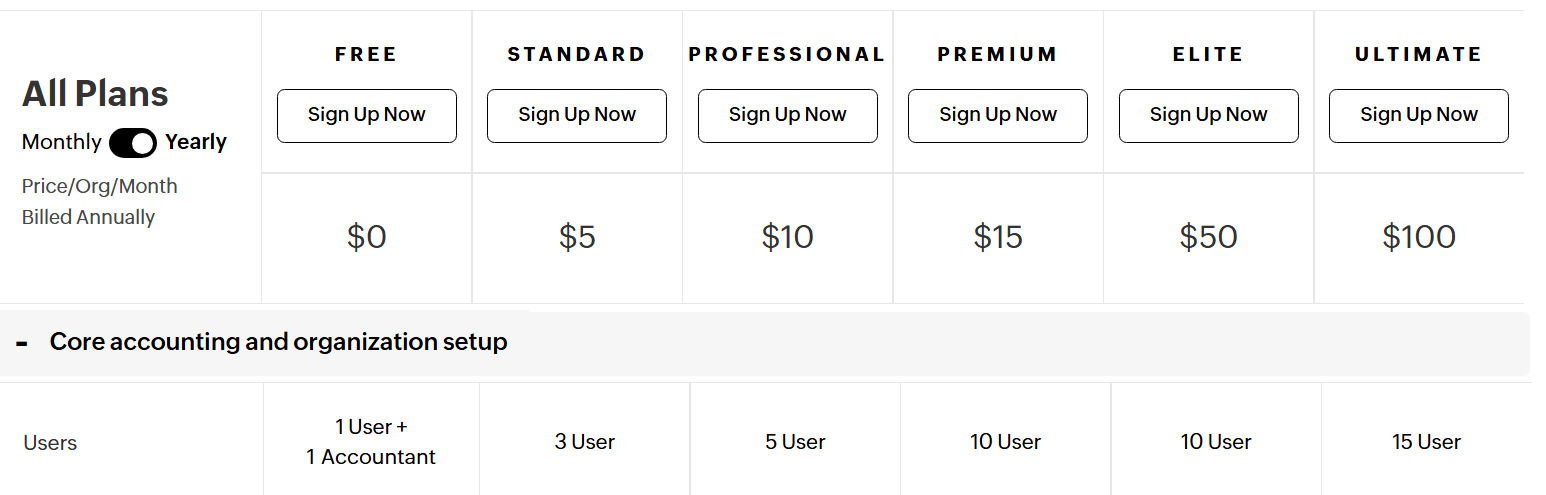
Always review the official Zoho Books pricing page for the latest plans and features, as they are occasionally updated.
Comparison: Zoho Books vs. FreshBooks vs. QuickBooks Online
| Feature/Plan | Zoho Books | FreshBooks | QuickBooks Online |
|---|---|---|---|
| Free Plan | Yes (1 user + 1 accountant) | No | No |
| Starting Price | $15/month (Standard Plan) | $6.30/month (Lite Plan) | $30/month (Simple Start) |
| Most Popular Plan | $20/month (Standard Plan) | $11.40/month (Plus Plan) | $70/month (Plus Plan) |
| Top Tier Plan | $240/month (Ultimate Plan) | Custom pricing (Select Plan) | $200/month (Advanced Plan) |
| Multi-Currency Support | Yes | Yes | Yes |
| Inventory Management | Yes | No | Yes |
| Project Management | Yes | Yes | Yes |
| Mobile App | Yes (iOS & Android) | Yes (iOS & Android) | Yes (iOS & Android) |
| Automation Features | Yes | Yes | Yes |
| Integrations | Zoho Ecosystem + 50+ apps | 100+ apps | 650+ apps |
Key Takeaways
- Zoho Books: Offers a comprehensive suite of features at an affordable price point, making it ideal for small to medium-sized businesses seeking integration with other Zoho applications.
- FreshBooks: Known for its user-friendly interface and strong customer support, FreshBooks is well-suited for freelancers and service-based businesses.
- QuickBooks Online: Provides extensive features and a vast number of integrations, catering to businesses that require advanced accounting capabilities and scalability.
What are users saying?
I looked at trusted review sites like Trustpilot, G2 and even Reddit threads on cloud accounting to get a balanced picture of user sentiments.
Here’s what users say about Zoho Books to help you decide if it’s right for you.
Positive reviews:
- Excellent value for money compared to competitors like QuickBooks
- The user interface is easy to navigate, even for non-tech savvy users
- Like other top players, Zoho Books also offers powerful automation features for easy invoicing, approvals and reminders
- Easy and seamless integration with other Zoho apps
- Feature-rich and convenient mobile app for easy invoicing, expense tracking and more
- The multi-currency feature enables users to manage international transactions and taxes
- Customer support is fast, knowledgeable and patient
Negative reviews:
- New users may find the initial setup overwhelming
- There are limited third-party integrations outside the Zoho ecosystem
- Users outside the U.S. or India need third-party payroll solutions, which adds extra cost and complexity
- Lower tier plans have limited features, so to unlock more advanced features you have to pay more
- Some users report challenges in customer support due to timezone differences
Is Zoho Books right for you?
Now that you know what Zoho Books offers and what other users say, the next step is to see whether it’s the right fit for your business.
Zoho Books is a perfect choice for you if you fall in this group:
- You’re a small to mid-sized business that needs reliable accounting
- You run a service-based business and need time tracking, project billing or a dedicated client portal
- You already use other Zoho apps like Zoho CRM, Zoho Inventory and others as integration with Zoho Books is seamless
- Your business is global or expanding, you benefit from the multicurrency and region-specific tax features
- You rely on automation of reminders, recurrent billing and approvals
- You need cloud accounting on the go, as the mobile app is very reliable
- You’re budget conscious but need powerful features as Zoho Bookshas powerful features at competitive prices
On the other hand, Zoho Books may not be for you if you have these attributes:
- You need built-in payroll in every country – currently only available in India and the U.S.
- You depend heavily on third-party apps outside Zoho’s ecosystem (integrations are more limited compared to QuickBooks Online or Xero)
- You run a large enterprise with complex accounting needs — Zoho Books may be too lightweight
- You want offline-first accounting — Zoho Books is cloud-focused, while QuickBooks Desktop still supports offline workflows
Bottom line:
If you’re a freelancer, small to mid-sized business, Zoho Books provides most of the basic features, with excellent customer support.
The availability of multiple plans gives you more options to select features suited for your business.
However, if your business requires advanced payroll management, deals with global clients where transactions are in different currencies or requires deep customizations, you may need to look at other cloud accounting companies.
Zoho Books remains a top cloud accounting software that is worth considering.
Live chat support is included on all paid plans, meaning help is only a click away whenever you run into issues.
Our final verdict
My take: Zoho Books is a solid competitor for freelancers, startups, and small to mid-sized businesses that want affordable, cloud-based accounting.
The free plan is attractive if you’re just starting out, but keep in mind that many essential features are unlocked only on the paid tiers.
Still, the upgrade path is flexible and affordable compared to other leading platforms.
While Zoho Books doesn’t surpass FreshBooks in terms of simplicity or QuickBooks Online in terms of integrations, it holds its own as a feature-rich solution, especially if you’re already in the Zoho ecosystem.
- What stands out is its balance of automation, multi-currency support, and mobile usability, all at a price point that won’t break your wallet.
- On the downside, the limited third-party integrations may frustrate businesses that rely on apps outside Zoho, and larger enterprises may find the software too lightweight for complex needs.
Whether you run a service-based business needing time tracking and project billing or a product-based business managing inventory and taxes, Zoho Books offers the built-in features to help you stay on top of your finances in 2025 and beyond.
FAQ
Can Zoho Books handle payroll?
Yes, you can use a built-in payroll tool if you stay in India or the U.S. However, for other regions, you need a third-party payroll add-on.
How much does it cost to use Zoho Books?
There are 6 plans in Zoho Books and the prices are as follows:
- Free Plan: $0 per month, Ideal for freelancers and small business with low yearly revenue, 1000 invoices, Allows 1 user and 1 accountant.
- Standard Plan: $5 per month, Allows up to 3 users, 5000 invoices, You also get live chat, phone and email support.
- Professional Plan: $10 per month, Allows up to 5 users, 10000 invoices
- Premium Plan: $15 per month, Allows up to 10 users, 25000 invoices
- Elite Plan: $50 per month, Allows up to 10 users, 100000 invoices
- Ultimate Plan: $100 per month, Allows up to 15 users, unlock all advanced features
All paid plans come with a free plan, with no need of a credit card to activate the plan.
Can I collaborate with clients on Zoho Books?
Yes, there's a dedicated client portal on Zoho Books where you can invite clients to comment, leave feedback, approve quotations and more.
Is the Zoho Books mobile app reliable?
Yes, the mobile app is praised for handling effectively most basic functions like invoicing, expense tracking, time tracking and account overview. However, for more advanced features you need to use the web version.
What reports can I generate with Zoho Books?
Zoho Books allows you to generate customizable reports that fall in these categories:
- Profit and Loss
- Balance Sheet
- Cash Flow Statements
- Sales and Customer Reports
- Tax Reports
- Inventory Reports like stock summary, item sales and inventory valuation
- Project Reports
- Time-tracking Reports
- Banking Reports
- Custom Reports using filters like date ranges and other criteria
These reports can easily be shared, downloaded and exported, all within Zoho Books.
Can my team track time individually with Zoho Books?
Yes, Zoho Books allows each team member to track their own time so that billing is fast and accurate. This enhances trust and transparency with clients.
Is Zoho Books customer support helpful?
Yes, Zoho Books customer support is solid, but it's not the best. There are inconsistencies, with some users reporting delays during peak hours. The Free Plan has no live customer support.
How does Zoho Books compare to QuickBooks Online, Xero and FreshBooks?
Zoho Books is a solid alternative to QuickBooks Online, Xero or FreshBooks. It has more features than FreshBooks, more cost-effective than QuickBooks Online and more intuitive than Xero.
Wrapping up
If you want to explore more options, check out the top cloud accounting services and take your business to the next level.
Now that you have all the information about Zoho Books, open your account and start your free trial.
Comparison:
- Zoho Books vs QuickBooks Online
- Zoho Books vs Xero
- Zoho Books vs FreshBooks
- Zoho Books vs Sage Business Accounting
- Zoho Books vs Kashoo
- Zoho Books vs Wave Accounting
- Zoho Books vs OneUp
- Zoho Books vs Patriot Software
- Zoho Books vs AccountEdge Pro
- Zoho Books vs ZipBooks
- Zoho Books vs BrightBook

- Best Accounting Software For Restaurants In 2026 - January 5, 2026
- Best Accounting Software For Retail Businesses In 2026 - January 4, 2026
- Best Accounting Software For Property Management - January 4, 2026