Last Updated on December 5, 2025
Managing finances is one of the biggest challenges for small and growing businesses.
Cloud-based accounting software has made it easier than ever to handle invoices, track expenses, manage taxes, and stay compliant, all from anywhere.
In this Sage business cloud accounting review, we’ll take a close look at how this software stacks up against the competition and whether it’s the right choice for your business.
Sage has long been a trusted name in business software, especially in the UK and Europe, and their cloud accounting solution is designed to help entrepreneurs, freelancers, and small businesses simplify daily bookkeeping while staying on top of cash flow.
However, with strong competitors like QuickBooks Online, Xero, and Zoho Books leading the market, the question is: does Sage offer enough unique features, value, and user satisfaction to deserve your attention?
Let’s dive in and explore Sage business cloud accounting step by step.
| Attribute | Score |
|---|---|
| Ease of Use | |
| Customer Support | |
| Integrations | |
| Features | |
| OVERALL RATING |
Pros
- Strong reputation and trust
- Affordable entry-level plans
- Easy invoicing and expense tracking
- Multi-currency support
- Built-in compliance tools
Cons
- Limited advanced features
- Smaller app marketplace
- Customer support can be hit-or-miss
- Not ideal for scaling businesses
- Mobile app usability issues
Jump To Section:
Company Background
Sage is one of the oldest and most trusted names in business software.
Founded in 1981 in Newcastle, UK, Sage originally focused on desktop-based accounting solutions for small and medium-sized businesses.
Over the decades, it has grown into a global brand, serving millions of businesses across more than 20 countries.
With the shift to cloud technology, Sage launched Sage business cloud accounting (previously known as Sage One) to provide small businesses with an online platform that’s accessible anytime, anywhere.
Unlike its older desktop software (such as Sage 50), this cloud-based version is streamlined for everyday bookkeeping tasks like invoicing, expense tracking, cash flow monitoring, and tax compliance.
Sage’s long history and wide presence in the UK, Europe, and South Africa make it a household name in those regions.
While it doesn’t dominate the U.S. market like QuickBooks Online or Xero, it continues to hold a strong position where regulatory compliance and tax-specific features give it an edge.
In short, Sage comes with the credibility of decades in the accounting industry, backed by a brand that understands the needs of small businesses and also adapting to the modern cloud era.
What Makes Sage Business Cloud Accounting Unique?
Sage business cloud accounting sets itself apart from other tools with its simplicity and compliance-first approach.
While competitors like QuickBooks Online, Xero, and Zoho Books focus heavily on automation and large app ecosystems, Sage leans into features that are practical, easy to use, and aligned with regional tax requirements.
Here’s what makes it unique:
1. Built-In VAT and Tax Compliance
Unlike many tools that require add-ons or manual setup, Sage includes VAT calculation and direct submissions to tax authorities in supported regions.
Benefit: Saves time during tax season and reduces the risk of penalties by keeping you compliant automatically.
2. Strong Multi-Currency Support
Sage offers built-in support for businesses dealing with global clients, including automatic exchange rate updates.
Benefit: Helps international businesses avoid errors when managing invoices, payments, and reporting across currencies.
3. Simplicity for Small Businesses
The platform is designed for non-accountants, with easy invoicing, expense tracking, and a clean dashboard.
Benefit: Makes it accessible for freelancers and small business owners who don’t have formal accounting training.
4. Sage Marketplace for Add-Ons
Though smaller than QuickBooks’ or Xero’s app ecosystem, Sage has its own marketplace of integrations, including payroll, payments, and industry-specific tools.
Benefit: Allows businesses to extend functionality without overwhelming complexity.
5. Legacy Trust + Modern Cloud
Sage combines decades of accounting expertise with cloud flexibility.
Benefit: Businesses transitioning from traditional desktop software can adapt more easily compared to jumping straight into platforms like Xero or Zoho Books.
Price and Value
Sage Business Cloud Accounting offers two main pricing tiers, making it accessible to freelancers, startups and small businesses.
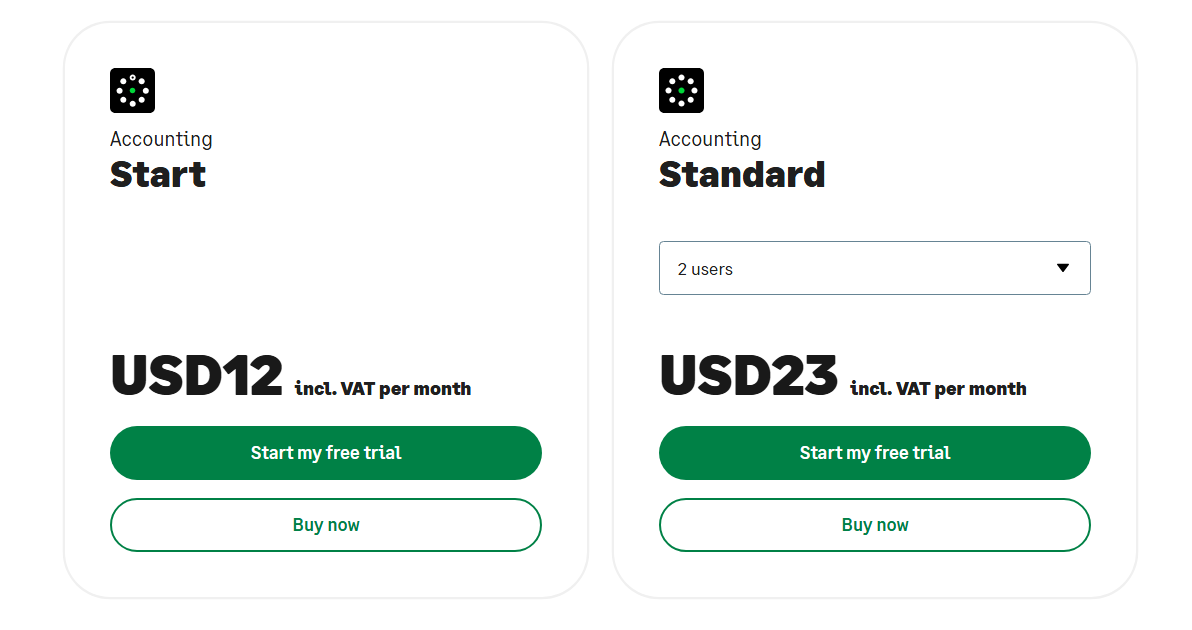
Here’s a breakdown:
1. Start Plan
Price is around $10 to $12 per month (varies by region).
Features:
- Basic invoicing
- Expense tracking
- Cash flow management
- Mobile access.
Best for: Freelancers and very small businesses just starting with cloud accounting.
Value: Extremely affordable entry point, but limited in advanced features like project tracking or detailed reporting.
2. Standard Plan
Price ranges around $23 to $30 per month (varies by region).
Features:
- Everything in Start, plus
- Multi-currency support
- Recurring invoices
- Bank reconciliation
- More comprehensive reporting.
Best for: Small businesses with growing complexity and international transactions.
Value: Solid balance of affordability and functionality, though still behind competitors like QuickBooks Online in terms of automation and third-party integrations.
Comparison to Competitors
QuickBooks Online: Higher price, but more advanced automation and app ecosystem.
Xero: Slightly higher cost, better reporting, and multiple users included.
Zoho Books: Similar pricing, strong for startups, but fewer built-in compliance features than Sage in some regions.
Takeaway:
Sage business cloud accounting is priced competitively, especially for small businesses seeking a simple, compliance-focused tool.
While it doesn’t offer all the bells and whistles of top-tier competitors, it provides good value for straightforward accounting needs.
What Are Users Saying?
User feedback provides valuable insight into how Sage business cloud accounting performs in real-world scenarios.
Overall, reviews highlight both strengths and areas for improvement.
Positive reviews
- Many users praise Sage’s simple, intuitive interface, which makes it accessible for business owners without accounting backgrounds.
- Users appreciate the built-in VAT and tax features, especially in the UK and Europe, which reduce the time spent preparing submissions.
- The low monthly cost, particularly for the Start plan, is frequently highlighted as a strong value proposition for small businesses.
- Businesses working internationally find multi-currency invoicing and exchange rate updates helpful.
Negative reviews
- Compared to QuickBooks Online or Xero, Sage lacks advanced automation like predictive cashflow, automated categorization, or AI-driven insights.
- Some users feel constrained by the fewer integrations available, especially for niche workflows.
- While helpful, support response times are sometimes slower and live chat options can be limited.
- Users report that the mobile app works for basic tasks, but more complex accounting functions are better handled on desktop.
Overall Sentiment
Most small businesses and freelancers find Sage business cloud accounting reliable, easy to use, and cost-effective, particularly when compliance and simplicity are top priorities.
However, growing businesses that need automation or extensive third-party integrations may find it limiting compared to competitors like QuickBooks Online, Xero, or Zoho Books.
Is Sage Business Cloud Accounting Right for You?
Sage Business Cloud Accounting is designed with simplicity and compliance in mind, making it a solid choice for certain business types.
However, it’s not a one-size-fits-all solution.
You should consider Sage in these scenarios:
- You’re a freelancer or solopreneur who wants affordable and straightforward tools for invoicing, expense tracking, and basic reporting.
- You’re a small businesses in the UK, Europe, or regions with strong Sage presence: Built-in VAT and compliance tools save time and reduce errors.
- Your business has limited accounting experience: Easy-to-use interface means you don’t need a professional accountant to manage daily bookkeeping.
You might want a different option in these scenarios:
- You’re a growing businesses seeking automation: Competitors like QuickBooks Online and Xero offer AI-driven categorization, predictive cashflow, and extensive integrations.
- Your company needs a large app ecosystem: Sage’s smaller marketplace may limit integration options compared to QuickBooks Online or Zoho Books.
Takeaway:
If your business prioritizes simplicity, affordability, and compliance, Sage business cloud accounting is a strong contender.
However, if you need advanced automation, a wide array of integrations, or scalable features for rapid growth, you may want to explore QuickBooks Online, Xero, or Zoho Books instead.
Our Final Verdict
Sage business cloud accounting is a solid, reliable, and affordable cloud accounting solution, particularly suited for freelancers, solopreneurs, and small businesses that prioritize simplicity and compliance.
Its strengths lie in:
- Easy-to-use interface
- Built-in VAT and tax compliance
- Affordable pricing and multi-currency support
- Trusted brand with decades of experience
However, it falls short in areas like automation, advanced reporting, and app integrations compared to top competitors.
Businesses expecting AI-driven insights, predictive cashflow, or a large marketplace of integrations may find Sage somewhat limiting.
Bottom Line:
Sage Business Cloud Accounting is great for small businesses that need a reliable, simple, and compliant solution at an affordable price.
FAQ
Can Sage Business Cloud Accounting handle payroll?
Sage integrates with Sage Payroll and other add-ons to manage payroll. However, payroll is not fully included in the base accounting package and may require an additional subscription depending on your region
How much does it cost to use Sage Business Cloud Accounting?
Pricing starts at around $10–$12/month for the Start plan and $25–$30/month for the Accounting plan (prices vary by region). Each plan includes core accounting features, with the higher tier offering multi-currency support and more advanced reporting.
Can I collaborate with clients on Sage Business Cloud Accounting?
Yes, you can invite clients or accountants to view reports, send invoices, or provide limited access for collaboration. However, the platform doesn’t offer as many collaborative workflow tools as some competitors.
Is the Sage Business Cloud Accounting mobile app reliable?
The mobile app is functional for basic tasks like invoicing and expense tracking, but some users find it less polished than apps from QuickBooks Online or Xero for more complex accounting tasks.
What reports can I generate with Sage Business Cloud Accounting?
You can generate profit & loss statements, balance sheets, cash flow summaries, VAT reports, and invoice summaries. These reports help with compliance and provide a clear picture of your financial health.
Can my team track time individually?
Sage does not include advanced time-tracking features by default. You may need to integrate with third-party apps if individual or project time tracking is essential.
Is Sage Business Cloud Accounting customer support helpful?
Support is available via email and phone, and many users find it helpful for common questions. Some users report slower response times compared to larger platforms like QuickBooks Online.
How does Sage Business Cloud Accounting compare to QuickBooks Online, Xero, or Zoho Books?
QuickBooks Online: More automation, advanced reporting, and a larger app ecosystem.
Xero: Strong multi-user support and polished interface, slightly higher cost.
Zoho Books: Affordable, great for startups, but Sage has stronger built-in compliance features in some regions.
Sage is best for businesses valuing simplicity, affordability, and tax compliance, while the others excel in automation and integration.
Wrapping Up
Sage Business Cloud Accounting is a reliable, user-friendly and cost-effective solution for small businesses, freelancers, and solopreneurs.
Its strengths lie in ease of use, built-in tax compliance, multi-currency support and a trusted brand reputation.
However, for businesses that need advanced automation, extensive integrations, or predictive insights, competitors may offer more flexibility and scalability.
Final Thought:
If your priorities are simplicity, affordability, and compliance, Sage business cloud accounting is a strong contender.
It’s especially ideal for businesses operating in regions where Sage is established and compliant with local tax regulations.
Ready to try Sage business cloud accounting?
Explore the plans and features today and see if it’s the right fit for your business.
Comparisons:
- Sage Business Cloud Accounting vs QuickBooks Online
- Sage Business Cloud Accounting vs Xero
- Sage Business Cloud Accounting vs Zoho Books
- Sage Business Cloud Accounting vs FreshBooks
- Sage Business Cloud Accounting vs AccountEdge Pro
- Sage Business Cloud Accounting vs Patriot Software
- Sage Business Cloud Accounting vs Wave
- Sage Business Cloud Accounting vs OneUp
- Sage Business Cloud Accounting vs Kashoo

- Best Accounting Software For Restaurants In 2026 - January 5, 2026
- Best Accounting Software For Retail Businesses In 2026 - January 4, 2026
- Best Accounting Software For Property Management - January 4, 2026