
Last Updated on January 4, 2026
If you’re a freelancer or small business owner keeping an eye on every dollar, you’ve probably searched for a reliable free accounting software and stumbled upon Wave.
Wave promises to do what many paid platforms charge for: send professional invoices, track income and expenses, and manage your books, all for free.
You don’t get no trials, no credit cards and definitely no hidden fees.
However, is Wave really powerful enough to run your business long-term?
When is it worth upgrading or adding paid services like payroll, bookkeeping support, or payment processing?
In this Wave accounting review, we break down what it offers for free, where it truly delivers, and when it makes sense to go premium.
This is important if you’re scaling or want to run your business smoother.
| Attribute | Score |
|---|---|
| Ease of Use | |
| Customer Support | |
| Integrations | |
| Features | |
| OVERALL RATING |
Pros
- Completely free
- User-friendly interface
- Unlimited invoices and users
- Professional reports like profit and loss, balance sheets, and tax summaries included
- Built-in upgrade path with optional add-ons
- Mobile receipt capture makes expense tracking convenient
- Multi-business support under one login
Cons
- Limited integrations with third-party apps
- No live support for free plan users
- Bank sync issues reported in some regions
- No full multi-currency accounting
- Not suitable for larger businesses
Jump To Section:
Company Background
Wave is a Canadian fintech company founded in 2009, built with a bold mission: to make accounting accessible to small businesses, freelancers and solopreneurs — FOR FREE.
Over the years, Wave has grown from a simple invoicing tool into a full-featured accounting platform used by over 500,000 small business owners around the world.
Its clean interface, ease of use, and genuinely free pricing model have made it a go-to choice for entrepreneurs on a budget.
In 2019, Wave was acquired by H&R Block, a major tax and accounting firm in North America.
This backing gave Wave greater resources and financial stability, while keeping its core offering free for users.
Today, Wave is especially popular among:
- Freelancers and consultants
- Home-based businesses
- Sole proprietors
- Startups testing the waters
The platform continues to evolve, offering optional paid services like payroll, expert bookkeeping, and payment processing.
You’re never forced to upgrade unless you’re ready, which is a advantage.
What Makes Wave Unique?
Wave stands out in the crowded accounting software market for offering truly useful features at no cost.
While many tools hide core features behind paywalls, Wave provides a robust free platform that actually works for real businesses. Here’s what makes it unique:
1. Double-Entry Accounting
Feature: Built-in, professional-grade accounting using double-entry bookkeeping.
Benefit: Your financial records are clean, accurate, and audit-ready even if you’re not a trained accountant. This reduces the risk of errors and makes tax time easier.
2. Unlimited Invoicing
Feature: Send as many invoices as you need, with full customization.
Benefit: You can create branded, professional invoices and get paid faster. Invoices can include payment terms, due dates, reminders, and even automatic follow-ups.
3. Income & Expense Tracking
Feature: Track all money in and out through manual entry or by connecting your bank.
Benefit: You always know where your money is going, helping you make better decisions and spot problems early without relying on spreadsheets.
4. Receipt Scanning via Mobile App
Feature: Use the mobile app to snap and upload expense receipts on the go.
Benefit: No more lost paper receipts. Everything is stored digitally and organized for tax time or audits.
5. Financial Reports
Feature: Access key reports like profit & loss, balance sheets, and tax summaries.
Benefit: Instantly see how your business is doing and stay ready for tax filing or funding applications without hiring a bookkeeper.
6. Integrated Payments (Optional Paid Add-On)
Feature: Accept credit card and bank payments directly through invoices (small transaction fee applies).
Benefit: Clients can pay you faster and more conveniently. Many users find this upgrade worth it simply because it improves cash flow and reduces chasing.
7. Payroll Services (Paid Feature, US & Canada Only)
Feature: Full-service payroll with tax filings and employee pay slips.
Benefit: When your business grows, Wave grows with you. Payroll takes time and precision so this upgrade simplifies compliance and saves hours.
8. Expert Bookkeeping Support (Paid Add-On)
Feature: Access to Wave Advisors consisting of real accountants who help manage your books or taxes.
Benefit: You can stop stressing over accounting and focus on running your business, knowing a pro has your back.
9. 100% Cloud-Based with Mobile Access
Feature: Wave runs entirely online, with mobile access via app.
Benefit: You can manage your business finances anytime and anywhere, whether you’re at the office, at home or traveling.
Together, these features make Wave an ideal platform to start for free and grow into.
You’re not just getting a stripped-down demo…
Instead, you’re getting a functional system with room to scale, and optional upgrades when you need more.
Pricing & Value
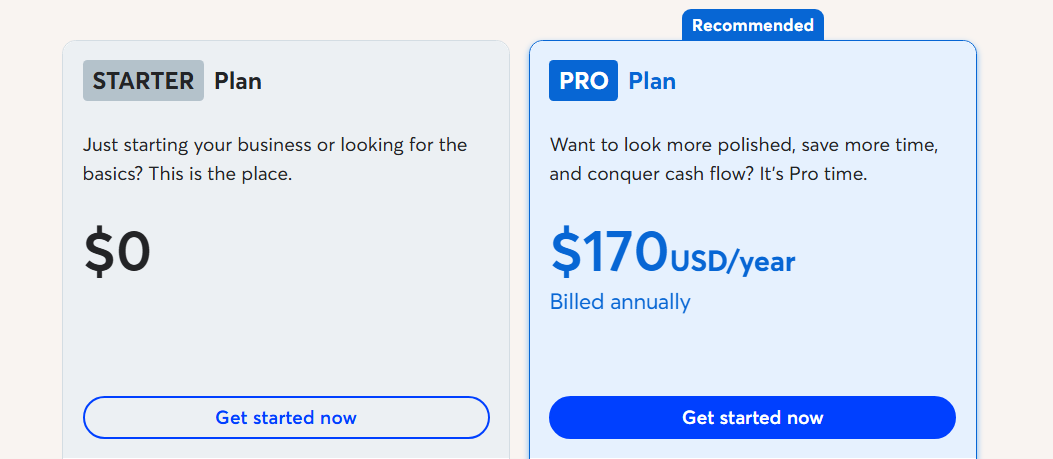
One of the biggest reasons small businesses and freelancers love Wave is simple: it’s actually free.
What You Get for Free
Wave’s core accounting tools are available at no cost, FOREVER.
You get this package:
- Unlimited invoicing
- Income and expense tracking
- Financial reports
- Receipt scanning via mobile app
- Unlimited users and businesses under one login
- Bank connections (in supported regions)
As I highlighted before, there’s no trial period, no hidden charges, and no pressure to upgrade.
This makes Wave one of the most generous free accounting platforms available today.
When You Might Want to Upgrade
While the free plan is enough for many, Wave also offers optional paid features that make life easier as your business grows:
| Feature | What you get | Price |
|---|---|---|
| Wave payments | Accept credit card & bank payments through invoices | Pay-per-use (starts at 2.9% + $0.60 per transaction) |
| Payroll (US & Canada only) | Full-service payroll, direct deposits, tax filings | Starting at $20/month + $6 per active employee |
| Wave advisors | 1-on-1 bookkeeping, accounting, or tax support | Starting at $149/month (or one-time tax prep from $299) |
These services are completely optional but they’re well-integrated and provide a seamless upgrade path when you need them.
Instead of switching platforms as your business grows, you can simply add what you need, when you need it.
Is It Worth It?
If you’re just starting out, Wave’s free tools give you everything to manage your books confidently.
In addition, if you begin offering services at scale, need to hire, or want to accept card payments, the premium add-ons are affordable compared to traditional accounting firms or enterprise-level platforms.
In short: Wave offers unbeatable value — free where it matters, and affordable when it counts.
What Users Are Saying
Wave has built a loyal user base, especially among freelancers, solo entrepreneurs, and small businesses looking for a dependable, no-cost solution.
I checked major review platforms like Capterra, G2, and Trustpilot.
It consistently earns strong ratings, typically between 4.2 and 4.5 out of 5 stars.
Positive reviews
- Many users praise Wave’s genuinely free offering with no limited-time trials or stripped-down functionality.
- The user-friendly design makes it easy for non-accountants to get started and feel confident managing their finances.
- Business owners appreciate the polished look of the invoices and the ability to customize them with logos and branding.
- Several reviews mention Wave as the perfect starting point for new businesses with tight budgets.
Negative reviews
- Some users report trouble syncing their bank accounts, especially outside of North America.
- While great for small businesses, Wave isn’t ideal for companies with complex needs (e.g., inventory tracking, multi-currency payroll, or large teams).
- Although the software works well, support is mainly self-serve unless you’re using a paid add-on like payroll or advisors.
Most users agree that Wave delivers serious value at zero cost, with clean tools and reliable performance
When you’re ready to grow, its paid features are worth the investment.
Is This Software Right for You?
Wave is a perfect fit for many small business owners but like any tool, it’s not for everyone.
Here’s who will benefit most from using Wave, and who might eventually outgrow it.
Wave is a great choice if you:
- Run a solo business or small team and need basic accounting, invoicing, and reporting without the cost.
- Prefer a clean, easy-to-use interface over complicated accounting software.
- Want to get started immediately without dealing with subscriptions, trials, or upsells.
- Don’t mind self-managing your books (or plan to add paid bookkeeping support later).
- Operate in the U.S. or Canada, where full bank integration and payroll services are available.
Wave may not be for you if you:
- Run a business with inventory management needs, advanced reporting, or multi-entity operations.
- Need full multi-currency support (Wave supports invoicing in multiple currencies, but not full multi-currency accounting).
- Require advanced automation or integrations with specific tools not supported by Wave.
- Want live customer support included in your free plan (support is prioritized for paid users).
Bottom line:
If you’re just getting started, Wave gives you the freedom to run your business without overhead.
When you’re ready to scale, you can easily upgrade by adding payroll, payment processing, or expert help, all within the same system.
If that sounds like your business, Wave is definitely worth trying.
Now if you feel you want to start with all the high-end features, there are other top cloud accounting softwares to explore.
Our Final Verdict
Wave delivers a truly free, professional-grade accounting solution for small business owners, freelancers, and startups.
You don’t need a finance degree to use it and you don’t need a monthly subscription to benefit from it.
Its clean design, unlimited invoicing, and solid reporting tools make it one of the best no-cost platforms on the market today.
If you want to accept online payments, run payroll or get expert help, Wave’s add-ons are priced fairly and integrate seamlessly.
Of course, this is not a fit for every business.
Larger businesses or those needing inventory, advanced integrations, or multi-currency accounting might need more powerful tools.
However, for lean operations, Wave is hard to beat.
Start free, use it as long as it works, and upgrade only when your business demands it.
FAQ
Can I accept credit card payments with Wave?
Yes, but this is a paid add-on. You can enable Wave Payments to accept credit cards or ACH bank transfers.
Fees apply per transaction (e.g., 2.9% + $0.60 for card payments). It’s optional but highly useful if you want to get paid faster.
Does Wave work in my country?
Wave is available globally, but certain features (like bank account syncing and payroll) work best in the United States and Canada.
If you’re outside North America, you can still use the core accounting and invoicing tools manually.
Can I manage multiple businesses in one Wave account?
Yes. Wave lets you manage multiple businesses under a single login — which is ideal if you run more than one venture or side hustle.
Is my data safe with Wave?
Absolutely. Wave uses industry-standard encryption and security protocols to keep your financial data protected. The company is owned by H&R Block, a trusted name in financial services.
Do I need an accountant to use Wave?
No. Wave is designed for non-accountants.
But if you want help, you can upgrade to Wave Advisors and get a professional bookkeeper or accountant to support your business.
Wrapping Up
Wave proves that powerful accounting software doesn’t have to come with a monthly fee.
It’s ideal for small business owners, freelancers, and anyone starting out who wants to stay on top of their finances without paying for tools they don’t need.
As your business grows, Wave grows with you, offering seamless upgrades for payments, payroll, and expert support when you’re ready.
It’s a smart place to start and a flexible platform to scale from.
If you’re looking for a no-risk, no-strings-attached way to manage your business finances, Wave is worth trying today.
Comparisons:
- Wave Accounting vs QuickBooks Online
- Wave Accounting vs Xero
- Wave Accounting vs Zoho Books
- Wave Accounting vs FreshBooks
- Wave Accounting vs Sage
- Wave Accounting vs Kashoo
- Wave Accounting vs OneUp
- Wave Accounting vs Patriot Software
- Wave Accounting vs AccountEdge Pro
- Wave Accounting vs BrightBook
- Wave Accounting vs ZipBooks

- Best Accounting Software For Restaurants In 2026 - January 5, 2026
- Best Accounting Software For Retail Businesses In 2026 - January 4, 2026
- Best Accounting Software For Property Management - January 4, 2026